
Email Signature Tools and GDPR: What Your DPO Needs to Know
On this page · 13 sections
- Why a signature tool is a GDPR question
- Controller and processor: who is responsible for what
- What each type of tool sends to the vendor
- What Article 28 says the DPA must contain
- International transfers
- Questions to ask any signature vendor
- Reviewing a contract you already have
- A DPA is not the whole job
- Who should be asking these questions
- Contract or architecture: which protection lasts?
- A GDPR email signature example
- Checklist: GDPR and your signature tool
- Frequently asked questions
TL;DR: Many email signature tools add the signature by routing your outbound email through their own servers. Under UK and EU GDPR that makes the vendor a data processor of your email content, and you must have a written Data Processing Agreement (DPA) before any data is processed. Add-in tools work inside Outlook, so a well-built one has no need to send email content anywhere, but you still need a narrower DPA. This article explains what each type of tool sends to the vendor, what Article 28 says the DPA must contain, and the questions to ask any vendor before you sign or renew.
UK GDPR and EU GDPR. This article cites UK GDPR because most of our readers are in the UK. The processor rules it describes (a written DPA, sub-processor controls and the other Article 28 duties) are almost the same under the EU GDPR. If you have staff, customers or an office in the EU, the same reasoning applies. The differences that matter are international transfers and the regulator. The UK relies on the IDTA or the UK Addendum to the EU SCCs, and on the UK-US data bridge. The EU relies on the EU SCCs and the EU-US Data Privacy Framework. Your regulator is the ICO in the UK and the national data protection authority in the EU.
Why a signature tool is a GDPR question
Most GDPR work in IT focuses on the obvious places personal data lives: the CRM, the HR system, the finance database. Email signature tools rarely come up. They should.
When IT teams compare signature tools, they look at features. Does it sync with Microsoft Entra ID (Microsoft’s cloud directory of staff accounts)? Can marketing add a campaign banner? Does it work on a Mac? The question that matters for GDPR is different: where does each email go between leaving Outlook and reaching the recipient?
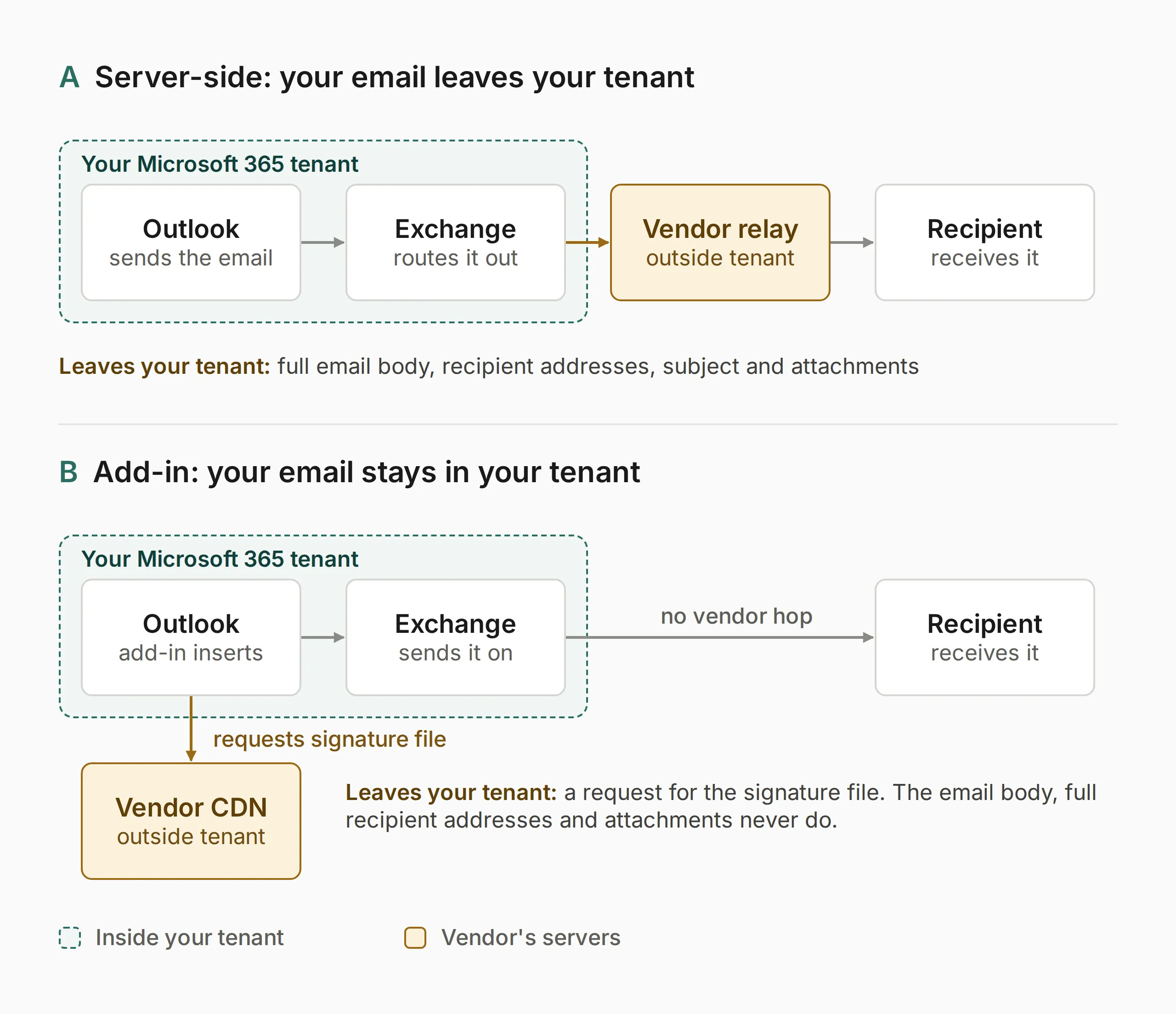
For many tools, the answer is that it passes through the vendor’s cloud servers. That is not a side effect. It is how the signature gets added. The email leaves your Microsoft 365 tenant (your organisation’s own part of Microsoft’s service), goes to the vendor, has the signature added, and is then sent on. The vendor’s servers see the body, the recipients, the subject and any attachments, for every outbound email.
That is processing of personal data on your behalf. It brings in Article 28 of the UK GDPR.
Controller and processor: who is responsible for what
UK GDPR splits responsibility between two roles.
- The controller decides why and how personal data is processed. For your outbound email, that is your organisation.
- The processor processes personal data on the controller’s behalf. A signature vendor that receives your email to add a signature is a processor of the personal data in those emails.
Article 28 says processing by a processor must be governed by a written contract. That contract is usually called a Data Processing Agreement, or DPA. The ICO’s guidance on contracts between controllers and processors is clear that a written contract is needed whenever a controller uses a processor. There is no size threshold below which it stops applying.
If you use a server-side signature tool without a signed DPA, you are not complying with Article 28. That is true however reputable the vendor is and however long you have used it. You stay responsible for checking that your processor meets the standard, too. “We assumed it was fine” is not a satisfactory response to an ICO investigation.
What each type of tool sends to the vendor
What the vendor processes depends almost entirely on how the tool adds the signature. Two tools can have near-identical features and very different data footprints. For how the two architectures work day to day, including what users see and how they are deployed, see Signature Management for Microsoft 365: Server-Side vs Add-In. This section covers only what each one means for data.
Server-side tools: the whole email
A server-side tool runs a relay, a mail server that sits between your Microsoft 365 tenant and the internet. To add the right signature, the relay must receive and read each message. On every outbound email it typically processes:
- the full body, in plain text and HTML
- recipient addresses and display names, in the To, Cc and Bcc fields
- the subject line
- attachments, because the whole message passes through the relay even if the vendor does not inspect them
- the sender’s identity, used to choose the template
- the send time and other message metadata
Take a professional services firm of 100 people, each sending 40 emails a working day (a planning assumption, not a measured figure). That is about 4,000 emails a day passing through the vendor’s servers. Many will contain client names, commercial discussions or other personal data. In financial services, some may fall under record-keeping rules. In healthcare, some may contain special category data, such as health information.
The DPA you sign with a server-side vendor is not a formality. It is a legal agreement about who can do what with a large share of your organisation’s correspondence.
Add-in tools: profile data and a signature request
An add-in tool does not sit in the mail path. It runs inside Outlook and inserts the signature when the user starts writing. The email then goes from Outlook through Exchange Online to the recipient, as it would with no signature tool at all.
The vendor’s systems handle three kinds of data:
- When an admin publishes a signature: employee profile data, such as name, job title, phone number, email address and photo. This usually comes from Entra ID through Microsoft Graph, or is typed into the admin portal.
- When someone starts an email: a request to the vendor’s content delivery network (CDN) for that person’s signature file. The request carries standard web data, such as the IP address and time. If the file name or address includes the sender’s email address, that is personal data too.
- If the tool logs signature use: an impression log. This might hold a sender identifier (ideally pseudonymised, meaning replaced with a reference code), the template used and the time. Some tools also log the recipient’s domain. To do that, the add-in has to read the recipient list.
A well-built add-in has no need to send the body, the subject, recipient addresses or attachments to the vendor. But that is a fact about the vendor’s code. It is not something Outlook guarantees.
How to check what an add-in sends
To insert a signature, an Outlook add-in needs at least the “read/write item” permission. Microsoft’s documentation on add-in permissions shows that this level also lets the add-in read the message body, subject and recipients. There is no signature-only permission. So “the add-in cannot see your email” is not a safe claim. The safe claim is that a signature add-in has no need to send any of it anywhere.
Check three things:
- The manifest permissions. The manifest is the file that tells Outlook what the add-in is and what it may do. Admins can see the permission level it requests in the Microsoft 365 admin centre. Ask the vendor why it needs anything beyond read/write item.
- The network requests. Watch what the add-in sends when someone writes a message. You should see one request for the signature file, and nothing that carries message content.
- The DPA and change terms. The add-in’s code loads from the vendor’s servers each time it runs. The vendor can change what it does without Outlook asking you again, as long as the permissions stay the same. A network check only proves what the code did on the day you looked. The contract is what holds over time.
Side by side
| Server-side | Add-in | |
|---|---|---|
| Email body sent to the vendor | Yes, every message | Not needed; check the add-in |
| Recipient addresses sent to the vendor | Yes | Not needed; some tools log the domain |
| Attachments pass through the vendor | Yes, in the full message | No |
| Employee profile data held by the vendor | Yes, to choose the template | Yes, to build the signature |
| DPA required | Yes | Yes |
| What the DPA must cover | Email content, metadata and profile data | Profile data and any usage logs |
| International transfer exposure | Higher: email content may leave the UK | Lower: profile data only |
| Sub-processor exposure | Higher: email passes through the hosting chain | Lower: usually a CDN and a database host |
What Article 28 says the DPA must contain
Article 28(3) lists what the contract must require of the processor. For a signature vendor, that means:
- Processing only on your documented instructions. The vendor may use the data only to deliver your signatures. Not for analytics, product development, AI training or anything else you have not authorised.
- Confidentiality. Everyone at the vendor who can access the data must be bound by confidentiality. Ask whether any staff can see email content, and what controls apply.
- Security. The vendor must have suitable technical and organisational measures, such as encryption in transit and access controls. You must judge whether they fit the risk. A vendor handling your whole outbound email stream is a bigger risk than one holding job titles.
- Sub-processors. Other companies involved in the processing, such as cloud hosts (AWS, Azure, Google Cloud), CDNs and logging tools, must be listed. You must authorise them, either one by one or in general with a right to object to changes. The list is often longer than people expect.
- Help with data subject rights. The vendor must help you answer requests from individuals, such as access or erasure requests, for data it holds.
- Help with security, breach notification and DPIAs. If the vendor has a breach involving your data, it must tell you without undue delay. You then have 72 hours to report it to the ICO if it is likely to put people’s rights at risk. Your DPA should give a notification time short enough for you to meet that deadline.
- Deletion or return at the end of the contract. The vendor must delete or return the data, and delete existing copies unless the law requires it to keep them. The DPA should say which, and how quickly.
- Audit and information. You must be able to check compliance. Many vendors meet this with ISO 27001 certification or SOC 2 reports instead of on-site audits. The right must still be in the contract.
The DPA should also state the scope: which categories of personal data the vendor processes, and why. For a server-side tool, that must include email content and recipient data, not only employee profiles. For an add-in tool, it should name profile data and any usage logs, and say in writing that no message content is sent to the vendor.
Following the Data (Use and Access) Act 2025, the ICO is reviewing some of its guidance in this area. Check for updates before you finalise a new DPA.
International transfers
If the vendor processes data outside the UK, that is an international transfer under UK GDPR. It needs an adequacy decision or another valid mechanism, such as the UK’s International Data Transfer Agreement (IDTA) or the UK Addendum to the EU Standard Contractual Clauses.
For a server-side tool, this applies to every email that passes through a server abroad. It applies even if the vendor is a UK company, when its infrastructure is hosted somewhere else. The UK-US data bridge covers transfers to US organisations certified under it, so check the vendor’s certification and make sure the DPA names the mechanism. “The vendor is US-based” is not, on its own, a transfer mechanism.
For an add-in tool, the same rules apply, but to a much smaller set of data: profile fields and any logs.
Questions to ask any signature vendor
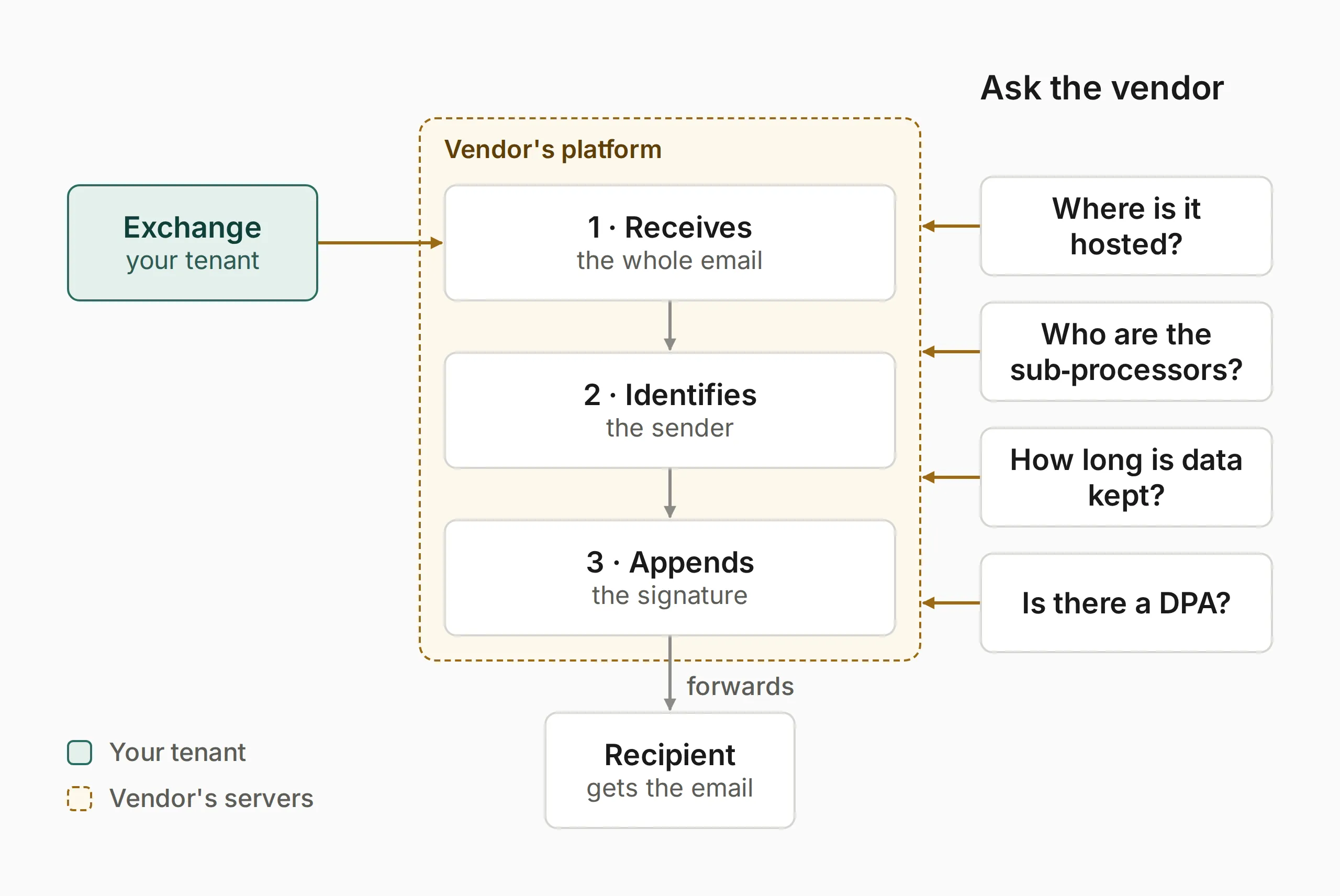
Get a written answer to each of these before you sign, and again at renewal.
- Does email content pass through your servers? You need a plain yes or no. Some vendors offer both a server-side mode and an add-in mode, so ask which mode you are buying and what each one touches.
- Can we see your DPA now? A reputable vendor has one ready before you process any data. If a vendor cannot produce one, or calls it optional, treat that as a red flag.
- What personal data do you process for us? For a server-side tool, expect email content, metadata, attachments and profile data. For an add-in tool, expect profile data and any logs. The answer feeds your own records.
- If it is an add-in, which permissions does it request, and why? Ask what it reads, whether anything leaves the device, and how you will be told when the code changes.
- Where is your infrastructure, and what transfer mechanism covers it? UK, EU, US or elsewhere?
- Who are your sub-processors, and how will you tell us about changes? Ask for the current list.
- How long do you keep data? Does any email content persist after the signature is added? If so, for how long and why?
- What happens to our data when we leave? Ask what is deleted, when, and how you get confirmation.
- How quickly will you tell us about a breach? Ask for the contractual time and the practical process.
- What security certifications do you hold? ISO 27001 covers information security management. ISO 27018 covers personal data in public clouds. Neither replaces a DPA, but both support the “sufficient guarantees” Article 28(1) asks for.
- Can we have audit reports on request? For example, a SOC 2 report or penetration test summary.
- Have you had a breach involving customer email data? The answer may well be no. It is still a fair question.
Reviewing a contract you already have
The duty to have a compliant contract does not end at sign-up. If you already use a signature tool, the most common gap is not a missing DPA. Most vendors include one in their standard terms. The gap is that nobody has read it. It was accepted as a tick-box at sign-up, and the sub-processor list and scope have never been checked.
Check three things in an existing DPA:
- The sub-processor list. Has it changed since you signed? Were you told?
- Where data is stored. Has the vendor added regions or moved infrastructure since the DPA was issued?
- The scope. Does it still match what the tool does? New integrations, more users or a switch between server-side and add-in modes can all change it.
A DPA is not the whole job
A DPA is necessary but not enough on its own. Before you deploy any processor, you also need to cover:
- A lawful basis. Under Article 6 you need a lawful basis for the processing, and Article 9 applies if special category data is involved. For signature tools, the usual basis is legitimate interests: you have a legitimate interest in consistent, legally compliant signatures. A short legitimate interests assessment supports your accountability duty.
- Records of processing. Under Article 30, most organisations must keep records of their processing activities. Add the signature tool as a processing activity, with the vendor listed as a processor. For a server-side tool, record that outbound email content is processed by a third party.
- A Data Protection Impact Assessment (DPIA). A DPIA is required where processing is likely to be high risk. Server-side routing covers a large volume of business correspondence. If you work in a regulated sector, or your email often contains sensitive personal data, consider whether you need one.
Who should be asking these questions
- IT admins choosing or renewing a tool: put the DPA question on your checklist before the demo. A vendor who walks you through its data flows without being pushed is a good sign.
- Data Protection Officers: if your organisation uses a signature tool and you have not reviewed the arrangement, add it to your next audit. The DPA, or its absence, belongs in your Article 30 records.
- Compliance managers in regulated sectors: where email content is sensitive, or client confidentiality is a professional duty, the narrower data footprint of an add-in tool counts for a lot.
- Legal and finance leads: if you bought the tool to put legal disclaimers on every email, check that the tool itself is not creating a data processing gap.
Contract or architecture: which protection lasts?
Both server-side and add-in vendors can have strong security and a compliant DPA. The difference is where the protection comes from.
With a server-side tool, the protection rests entirely on the vendor’s policies, its security and the DPA. The vendor receives every email, so the contract is the only thing limiting what happens to it.
With an add-in tool, part of the protection is structural. The email is never routed through the vendor, so there is no relay to breach. The rest is contractual. The add-in could read the message, so the DPA, the permissions and your own checks are what stop it sending anything. A DPA can be broken. A relay that does not exist cannot leak the email it never received.
The ICO’s guidance on data protection by design under Article 25 makes the same point in general terms: keeping data to a minimum works best as a technical control, not only as a promise.
Our interest. The people behind SigHQ work on email signature software, so we are not neutral on this.
We think the market has not looked hard enough at what server-side routing means for data. But server-side vendors do offer DPAs, many organisations have accepted them knowing what they cover, and for some the trade-offs favour server-side. The right question is not “does a DPA exist?” It is “have you read it, do you understand what it allows, and does that fit your duties to the people whose data is in your email?”
A GDPR email signature example
People searching for a GDPR email signature example usually want wording to put under the sign-off. UK GDPR does not prescribe any, so this is a sensible pattern, not a legal requirement. It covers contact details, the company details the Companies Act requires and a short line pointing to your privacy notice:
Jane Smith | Head of Operations Example Ltd | +44 (0)20 7946 0000 | jane.smith@example.co.uk Registered in England and Wales, no. 01234567. Registered office: 1 Example Street, London, EC1A 1AA. Example Ltd processes personal data in line with our privacy notice. To ask about your data, contact dpo@example.co.uk.
Keep the privacy line short, link to the full notice and use a monitored address for data requests. A line like this supports your transparency duties. It does not replace a DPA with the tool that adds it. For the Companies Act and sector-specific wording, see UK Email Footer Legal Requirements: Rules and Templates.
Checklist: GDPR and your signature tool
Use this before you deploy a new tool or when you review an existing one.
- Confirm whether the tool routes email through the vendor’s servers (server-side) or adds signatures inside Outlook (add-in)
- For an add-in, check the manifest permissions and the network requests it makes
- Get and read the vendor’s DPA before processing starts
- Check the DPA names the right categories of data for the architecture
- Check the sub-processor list, their locations and the transfer mechanism for anything outside the UK
- Confirm breach notification times and deletion terms
- Record the processing in your Article 30 records
- Decide whether you need a legitimate interests assessment
- Decide whether you need a DPIA, especially in a regulated sector
- For an existing tool, review the DPA against the current sub-processor list and scope
Frequently asked questions
Does every email signature tool need a Data Processing Agreement?
Yes, if it processes any personal data for you, and nearly all of them do. At the very least they hold employee names, job titles and contact details. A server-side tool needs a much broader DPA, because it also processes email content and recipient data. An add-in tool still needs one, but it should cover only profile data and any usage logs. Ask for that scope to be written into the DPA.
What happens if we do not have a DPA in place?
You are not complying with Article 28 of the UK GDPR. The ICO can take action against controllers who use processors without the required contract. If the vendor then has a breach affecting your data, your legal exposure is greater. It is also much harder to show the ICO that you took reasonable care.
How do I find out which sub-processors a vendor uses?
Ask the vendor for its current list, and check the DPA. Article 28(2) requires sub-processors to be disclosed and authorised, and changes to be notified. If a vendor cannot produce a clear list when you ask, treat that as a red flag.
Does an add-in-based signature tool ever see the body of an email?
It can. To insert a signature, an add-in needs the read/write item permission, and that also lets it read the body, subject and recipients. A well-built signature add-in has no reason to send any of that to the vendor. Check the manifest permissions and the network requests, and get the vendor to confirm in the DPA that no message content leaves the device.
Should we do a DPIA before deploying a server-side signature tool?
Consider it seriously if you work in a regulated sector, or if your email often contains sensitive personal data. Server-side routing processes a large volume of business correspondence. That is the kind of processing DPIA guidance is aimed at.
Correction, 19 October 2026: earlier versions of this article and of the two articles merged into it said that an add-in’s email body, recipient data and attachments are never sent to the vendor, and that Office.js makes the body inaccessible to add-ins. Outlook does not enforce that. A signature add-in needs the read/write item permission, which also lets it read the message. The article now says a well-built add-in has no need to send them, and tells you how to check. The note on SigHQ’s own add-in was also rewritten after checking the product’s code.
This article is for information only and is not legal advice. UK GDPR duties depend on the facts. If your processing is complex or you work in a regulated sector, take specialist legal advice. ICO guidance is available at ico.org.uk. Following the Data (Use and Access) Act 2025, some ICO guidance is under review, so check the current version before you make compliance decisions.